
AI-powered Windows dictation
 Final Word AI Voice Recognition Software
Professional Voice Recognition, Designed for Chiropractic Workflows
Dictate documentation into MyEMR and virtually any Windows application with intelligent voice detection, live AI transcription, and automatic text insertion.
Natural, hands-free dictation
AI Voice Recognition Built Around the Way Chiropractors Document
Final Word™ combines intelligent voice activity detection, enterprise-grade AI voice recognition, and real-time transcription in a streamlined desktop application for chiropractic documentation.
Speak Naturally
An advanced Voice Activity Detector recognizes when you begin speaking and streams only active speech for recognition—without constant button presses or manual recording.
See Recognition Live
Real-time status indicators show when Final Word is listening, streaming, processing, and returning recognized text, so the entire workflow remains visible.
Send Text Anywhere
Recognized text is inserted at the cursor in MyEMR, Microsoft Word, email, browsers, and virtually any other Windows application.
Connected chiropractic documentation
AI Voice Recognition for an Integrated Chiropractic Software Workflow
Final Word™ sends recognized speech directly into MyEMR at the active cursor, where voice recognition for chiropractic notes complements structured clinical entry, CatchPhrase narrative content, and AI-assisted documentation tools. Practices comparing approaches can use our chiropractic dictation software review to evaluate the complete workflow.
Because MyEMR and EMR Datacenter® operate within the shared Software Motif database ecosystem, dictated clinical details can remain part of a connected workflow spanning patient information, appointments, documentation, imaging, billing, and claims.
Intelligent Recognition at a Glance
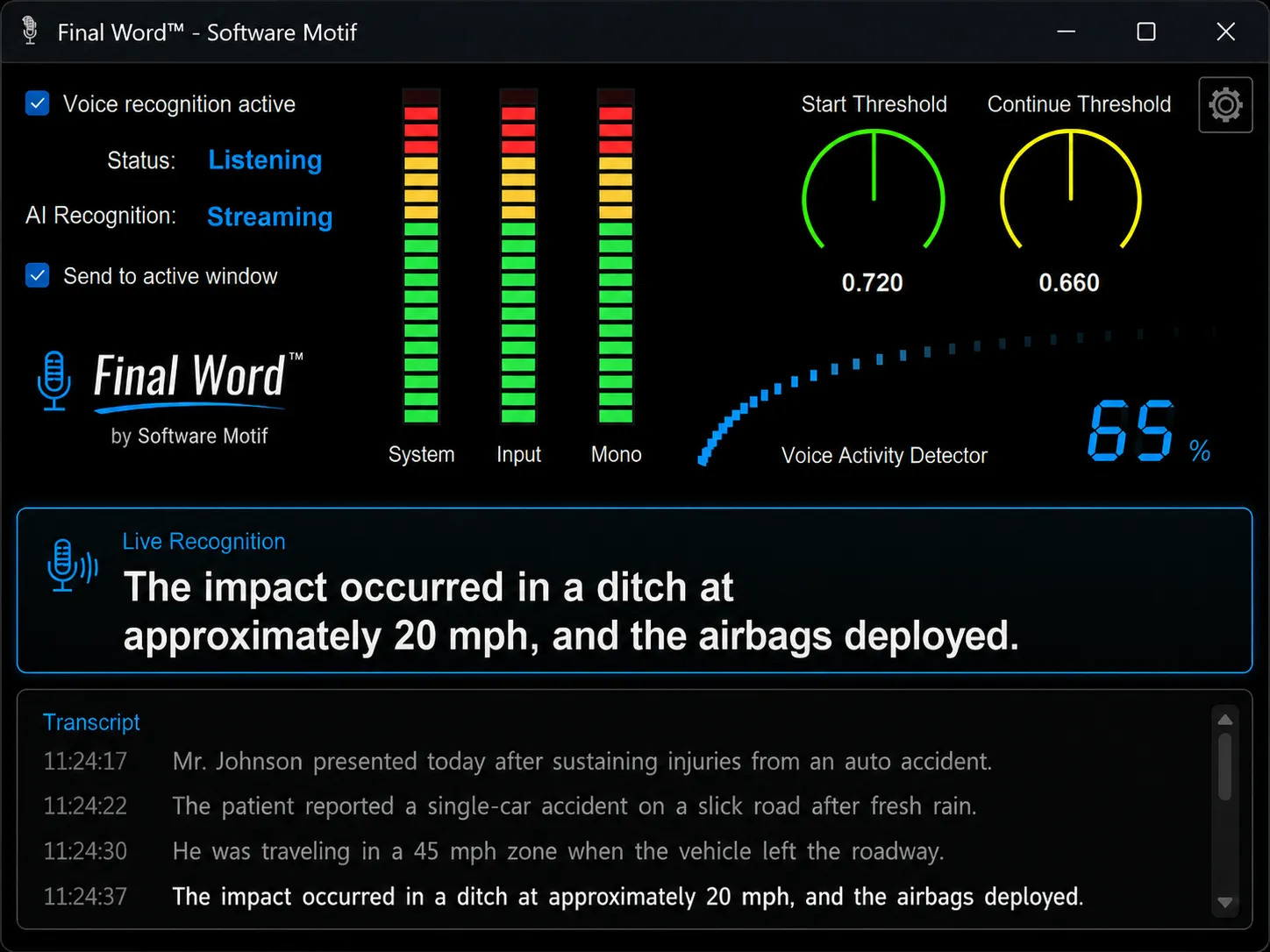
The Final Word™ dashboard provides immediate visual feedback throughout the recognition process, keeping essential controls and activity indicators in one focused workspace.
Voice Recognition Active
Enable or disable the speech recognition engine with one click.
Recognition Status
See whether voice detection is idle, listening, or stopped.
AI Recognition Status
Know when speech is waiting, streaming, or being processed.
Send to Active Window
Automatically place recognized text wherever your cursor is active.
Recognition pipeline
Every Stage, Clearly Visible
Professional audio-style monitoring gives users confidence that Final Word is hearing the correct input and actively processing speech.
- System Level Meter displays the Windows microphone input level.
- Direct Input Meter monitors the raw recognition-path signal.
- Mono Meter shows audio immediately before voice detection.
- Voice Activity Meter displays the live probability that speech is present.
Precision voice detection
Adjust Recognition to Your Microphone and Office
Two sensitivity controls help Final Word™ adapt to headset microphones, desktop microphones, different speaking styles, quiet offices, and active clinics.
Start Threshold
Determines how confidently speech must be detected before recognition begins.
Continue Threshold
Determines when recognition remains active or concludes after a natural pause.
Live Transcription with a Complete Session History
Verify the latest phrase at a glance, review earlier text, and keep dictating without interrupting your documentation workflow.
Live Recognition
Each completed phrase appears in large, high-contrast text, making it easy to verify the latest recognition result before continuing.
Transcript History
Recognized phrases accumulate in a running transcript that can be reviewed, copied, or referenced during the current dictation session.
Built for Reliability
Final Word™ includes an integrated technical processing log with detailed information about microphone input, voice activity detection, recognition activity, and returned text. Technical staff gain clear visibility into the recognition pipeline while the main user experience stays simple and focused.
Voice Recognition That Works the Way You Do
Speak naturally. Pause naturally. Continue naturally. Final Word intelligently manages recognition behind the scenes while keeping you informed through an intuitive dashboard inspired by professional audio equipment.
Bring Faster AI Dictation to Your Chiropractic Workflow
Use Final Word™ to document patient encounters in MyEMR, compose reports, and dictate into virtually any Windows application with the transparency and control professionals expect.
Contact Software Motif